Read Records from List
Instructions for using the "Read Records from List" block. Reading records with filtering and pagination in chat bot
This block allows the bot to send records from a list to the client.
.png)
Simplest example of sending list to client
You can specify a search field by which the search will be performed for any other phrase from the previous block.
.png)
Search in list by specified field
Each record is sent as a separate message sequentially, in addition, a picture or file also comes as a separate message. The text message is configured as a template, in which list fields are written as variables, simply click on the button below with the name of the desired field and it will be inserted into the text.
.png)
Setting up template for sending records from list
When there are many records, you can enable pagination and set the number of records to send to the client. You can also set an arbitrary template for page selection, where {n} denotes the page number. For example, the client sends the bot the command "Page 2" and the bot responds by sending 10 more records from the second page of the list.
.png)
Pagination of records
To configure list sorting, you can add the necessary fields:
.png)
Sorting records
To set additional conditions for selecting data from the list, we added the Additional Filters section.
.png)
Filtering records
Filter "!=" - not equal
"Contact ID" and "Bot ID" filters for "Read Record(s) from List" blocks
You can filter data by your ID. For example, if the list stores records associated with your contact, you can make a selection of these records. To do this, you need to write the constant "id" in the additional filters and you will get a selection of all records where they have your contact ID.
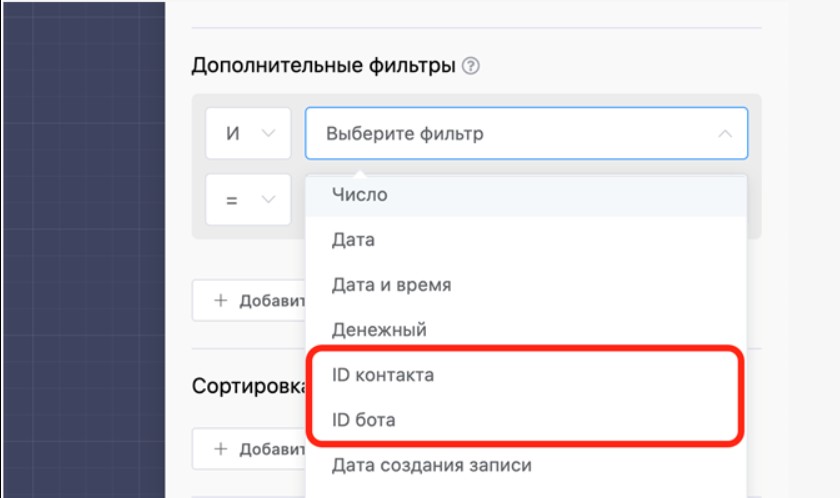
Data filtering
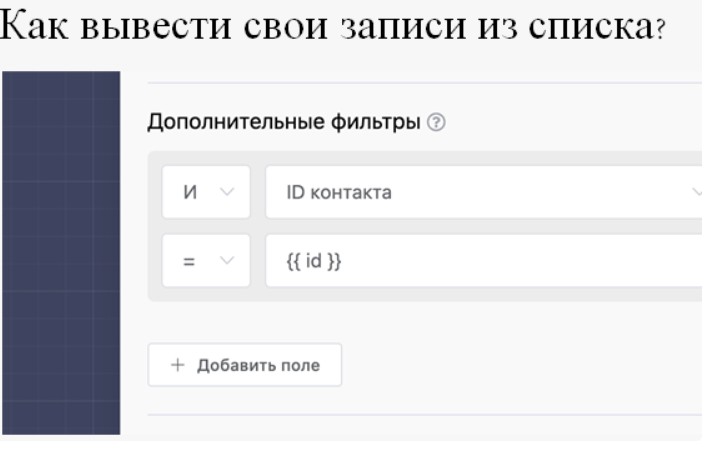
Data filtering by contact ID
Online store in Telegram: creating catalogs, cart and payment processing
Create a full-fledged online store in Telegram from scratch by watching 2 detailed videos. In them you will learn creating product lists, setting up record reading blocks, built-in bot, cart, payment system integration and importing catalog from Excel for sales automation.
Ready template for installing the "How to Create a Free Store in Telegram" project in one click:
🎁 Free course on chat bot and MiniApp development for all users with active PRO subscription is already available on LEADTEX.
10 detailed lessons with immersion from A to Z.
Start learning right now - Start learning.