GetCourse Order
Chat bot integration with GetCourse. Integration with GetCourse for creating orders and processing payments
How to Integrate Chat Bot with GetCourse
To Create Integration
Go to section Settings → Integrations → GetCourse.\ You need to specify "Account name" and "Secret key". You can find them at:\ {your getcourse account}/saas/account/api
.png)
GetCourse Integration
To Create Order
on GetCourse, the contact must have a filled email (user identification on GetCourse is done via email).
When the block is executed, it sends information to GetCourse, where a "new" order is created.
The chat bot user will be added to the GetCourse user list with the "Student" type and "In Database" status if the system does not find a user with the same email in the database.
Additionally, the contact id in the bot is sent to GetCourse. To save it, you need to create an additional field "contact_id" on GetCourse (field type "string").
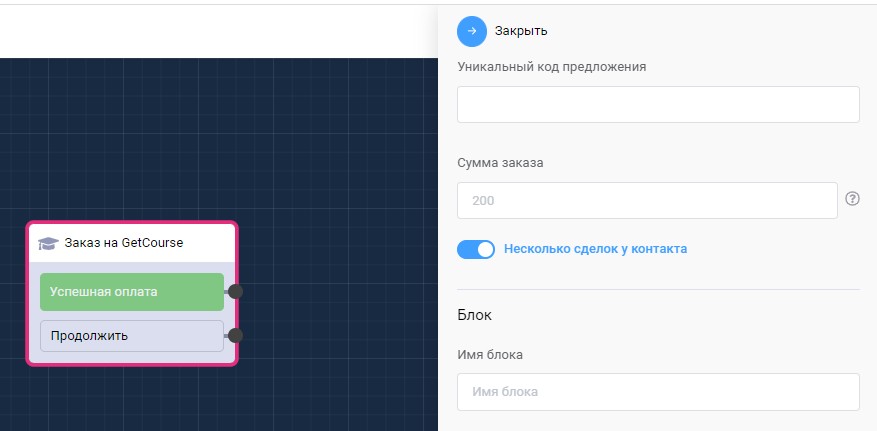
"Create Order on GetCourse" block in scenario
In the "GetCourse Order" block, you need to specify a unique offer number (created on GetCourse side in the offer "Settings" section. The order amount is also taken from the offer card.
Information
The order amount must be greater than 0. Zero orders are not sent to GetCourse
From the system button "Continue" you can further guide the user through the bot scenario, or send information that the payment link will arrive within 10-15 minutes (feature of GetCourse process triggering).
Information from the system button "Successful Payment" will come to the user only after the process for sending the link to the user with course access is completed.
Sending Payment Links with Course Access
In processes for sending links, it is necessary to use a webhook for sending notifications, generated after successful integration
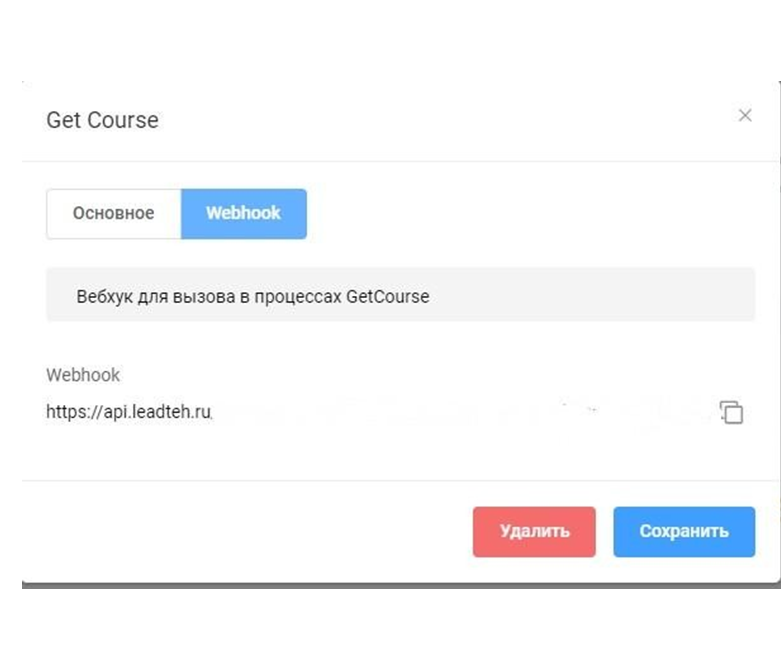
Getting Webhook for Integration Setup
First process (payment link) is created for orders. Entry rule: belongs to user who has order for offer "Course...", order status is new, user registration type is "Created via API". In the process itself, you need to create a task for the object "Call url", where select method "POST" and insert the generated webhook from the bot, and also add parameters to the link: \ ?email={object.user.email}&payment_link={object.payment_link} \ Leave other task settings as default.
Second process (course links after successful payment) is created for purchases. Entry rule: status "active", product "Course...". In the process itself, you need to create a task for the object "Call url", where select method "POST" and insert the generated webhook from the bot, and also add parameters to the link: \ ?email={object.user.email}&link={object.training_link}\ Leave other task settings as default.
Information
To activate processes, select task creation "On object creation". Tasks do not trigger immediately, up to 10-15 minutes after creation
In the LEADTEX personal account, 250+ lessons on developing chat bots and MiniApps are already available, as well as the opportunity to join the largest no-code developer community with 6000+ participants - Go to Personal Account.