Combining Blocks
Creating bot scenarios in constructor: cases on combining various blocks
Our platform has 60 different blocks that can be combined with each other. Here you will find combination options that may be useful when building a bot
1) Subscriber Data Collection
Message Chain + Write to Google Table or Add Record to List
If you need to save user responses, enable the "save responses to user variable" toggle in the message chain, give it a name. You can place several "message chain" blocks in a row, connecting them via "any other phrase" connection if you need to save the message that users write, or via button connections if you need to save menu item names. Then add a Write to Google Table block (you must first integrate your Google account with our platform) or Add Record to List (you must first create a list). After all this, user responses will be transferred either to a Google table or to our platform list (data can be downloaded as an Excel table).
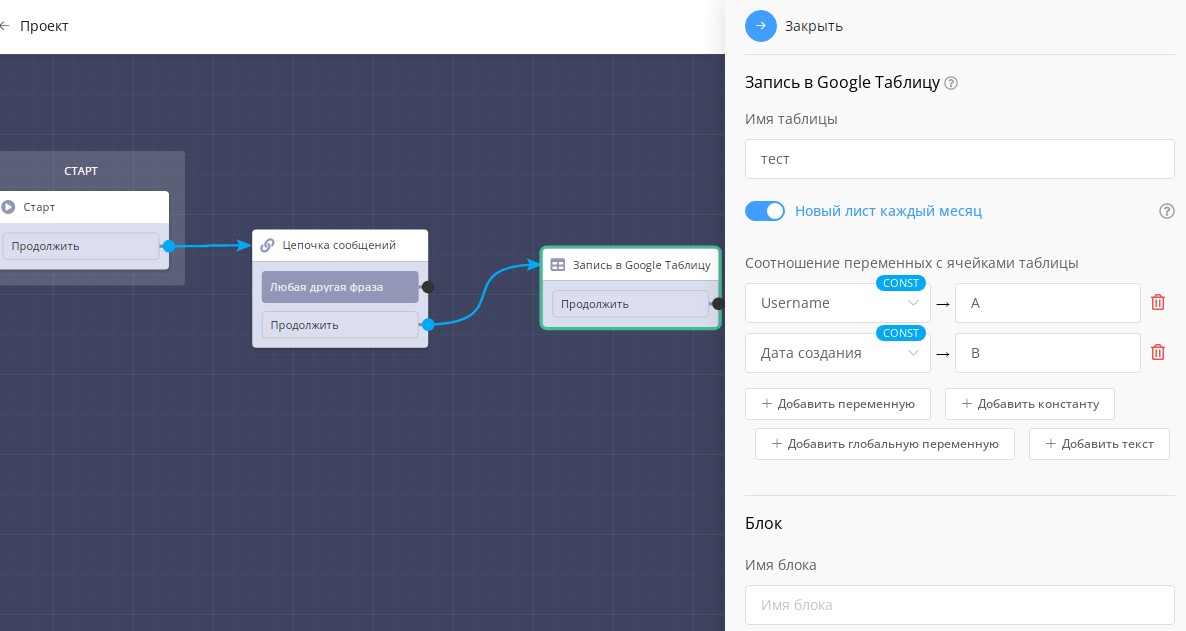
Example scenario for data collection in Google Table
2) Reminder if User Did Not Press Any Button
Message Chain + Assign Tag (from buttons) + Delay (from continue connection) + Condition "tag check" + Message Chain
If you need to remind the user that they used the menu at some stage, you can do this as follows. After menu buttons, you assign a tag (for example, "pressed"). And from the "continue" connection, you place a "delay" block for the amount of time after which you want to send a reminder. Then add a "condition" block and check by tag (in our example "pressed"). For condition "yes" you don't place anything, meaning users pressed menu buttons and don't need a reminder. For condition "no" you add a reminder, because if there's no tag, the buttons were not used.
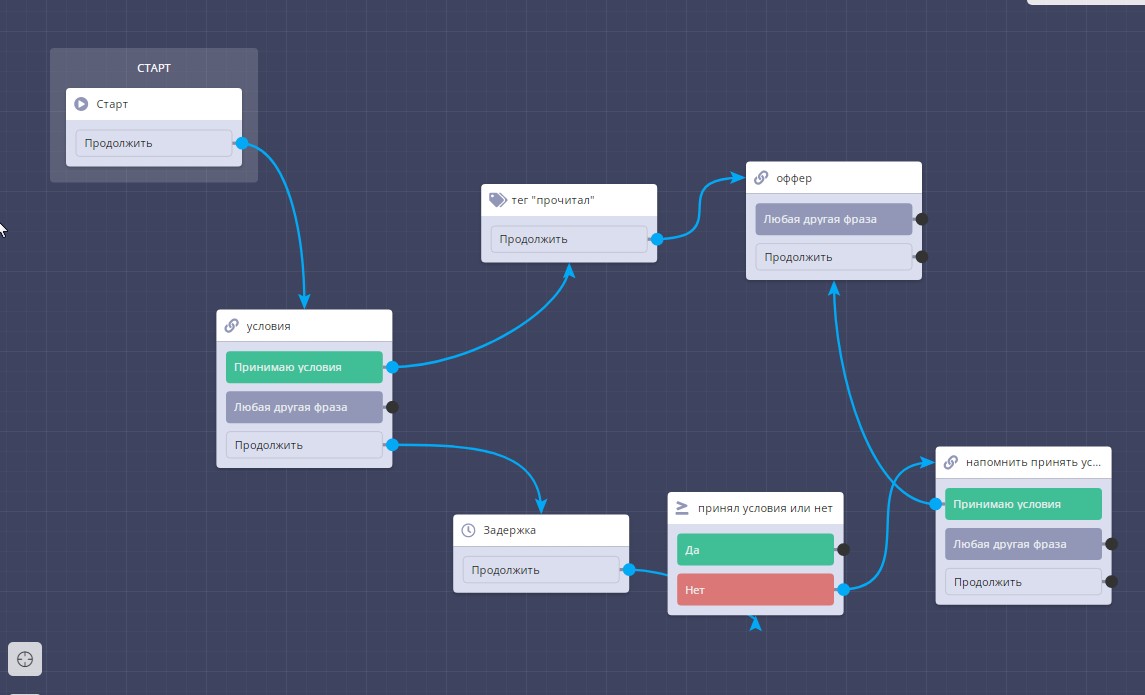
Example scenario for sending delayed reminder to user
3) Password Entry to Chat Bot
Message Chain + Condition (message matches text).
Any user can find the bot by username and press start. But you can restrict further movement through the scenario. To do this, ask in the "message chain" block to enter a password, from the "any other phrase" connection lead to a condition block, where by "message matches text" you check the correctness of the entered password. From the "yes" connection, send further through the scenario, meaning the password was entered correctly. From the "no" connection, notify that the user sent an incorrect password. For this, use the message chain block again. You can also offer to enter the password again and set the connection back to the condition.
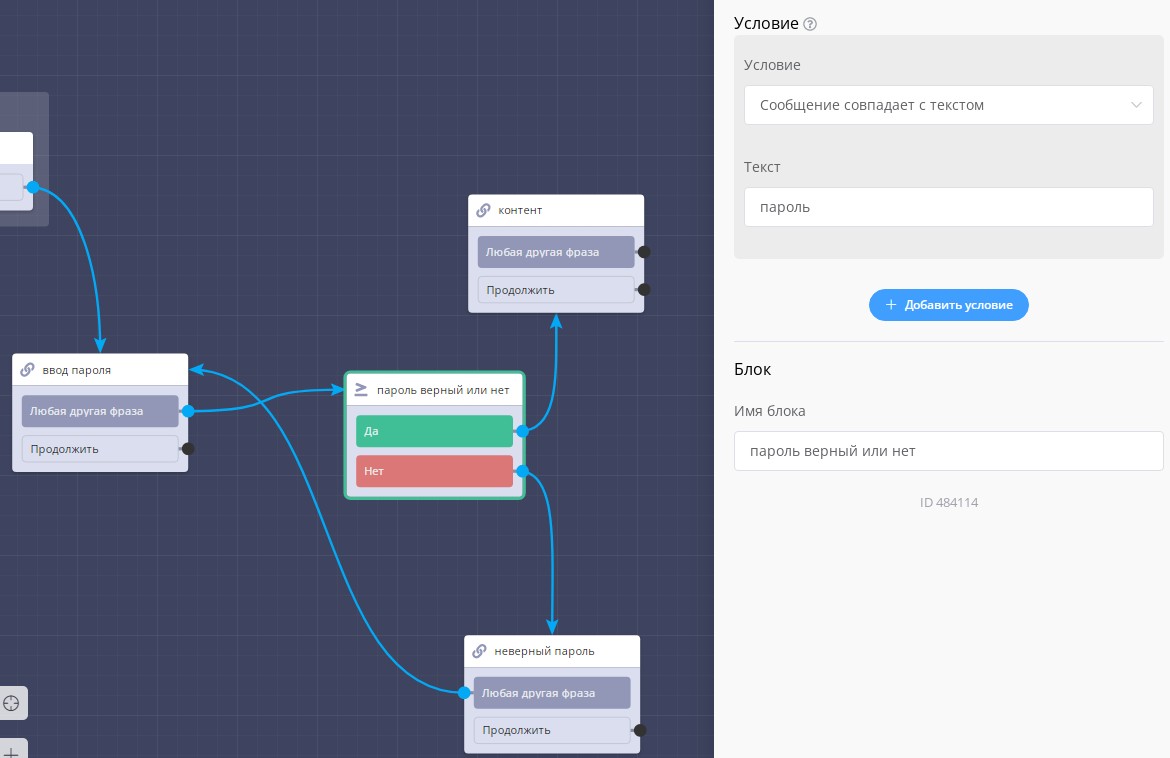
Example scenario with password-protected content access
4) Notifications About New Users
"Start" block + "Application" block
If you want to know when someone enters your chat bot, add an "Application" block immediately after the "Start" block, specifying which communication channel you want to receive notifications on.
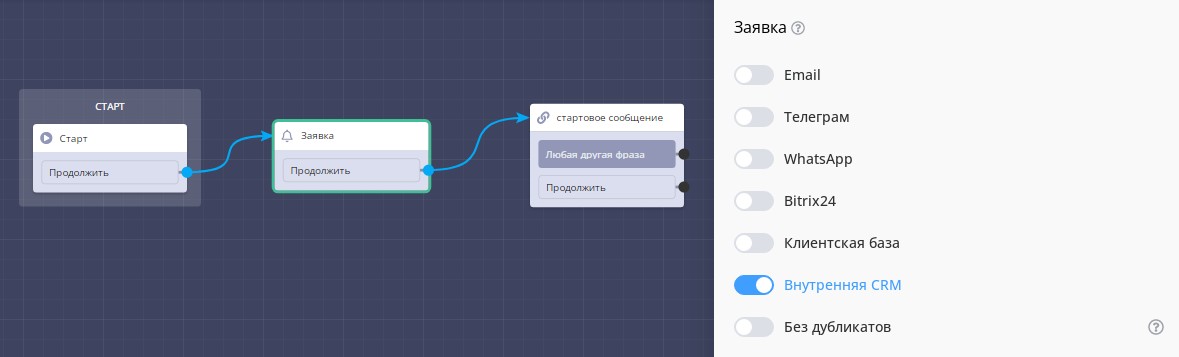
Example scenario with sending notifications about bot launch
5) Adding Application to Required CRM Stage
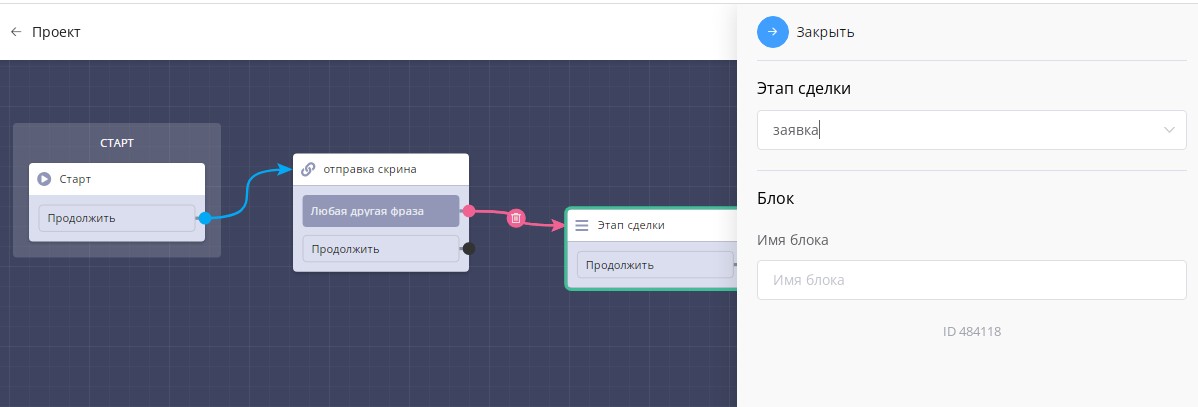
Example scenario with adding application to required deal stage in internal CRM
6) If You Have Accumulated Too Many Blocks in One Scenario
Message Chain + Scenario
To avoid adding all bot blocks to one scenario map, create several scenarios, for example, according to menu sections. Then from menu buttons, place a "Scenario" block, lead to the corresponding scenario, and there you build the bot further according to the task.
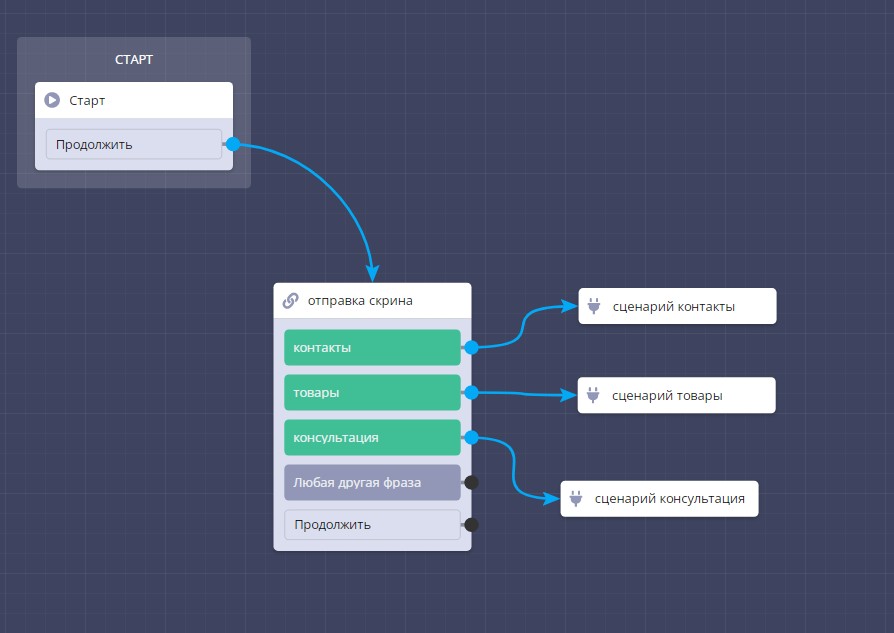
Example scenario with menu for transitioning to various scenarios in bot
7) Delete Unnecessary Users from Bot
Message Chain + Delay + Delete User from Bot
If the bot is created for a specific task, for example, event payment, then in the very first block from the "continue" connection, place a "delay" block for the number of days you need. And after it, a "Delete User from Bot" block. One month after deletion, such users will stop being counted in the tariff counter.
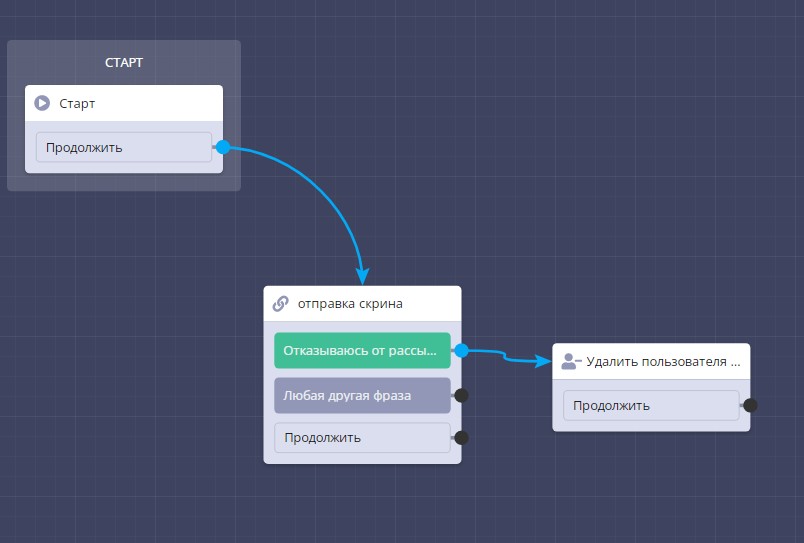
Example scenario with bot contact deletion
8) Code Entry Check for Prize Drawing
Message Chain + Check Record Existence in List + Message Chain
You create a list in advance and upload a list of codes there. Then through the "message chain" block, request it, and from the "any other phrase" connection, lead to "Check Record Existence in List" (i.e., the sent code). From the "exists" connection, through the "message chain" block, add a notification about receiving a prize, because if the record exists, the code was entered correctly. Accordingly, from the "does not exist" connection, notify that the user entered an incorrect code.
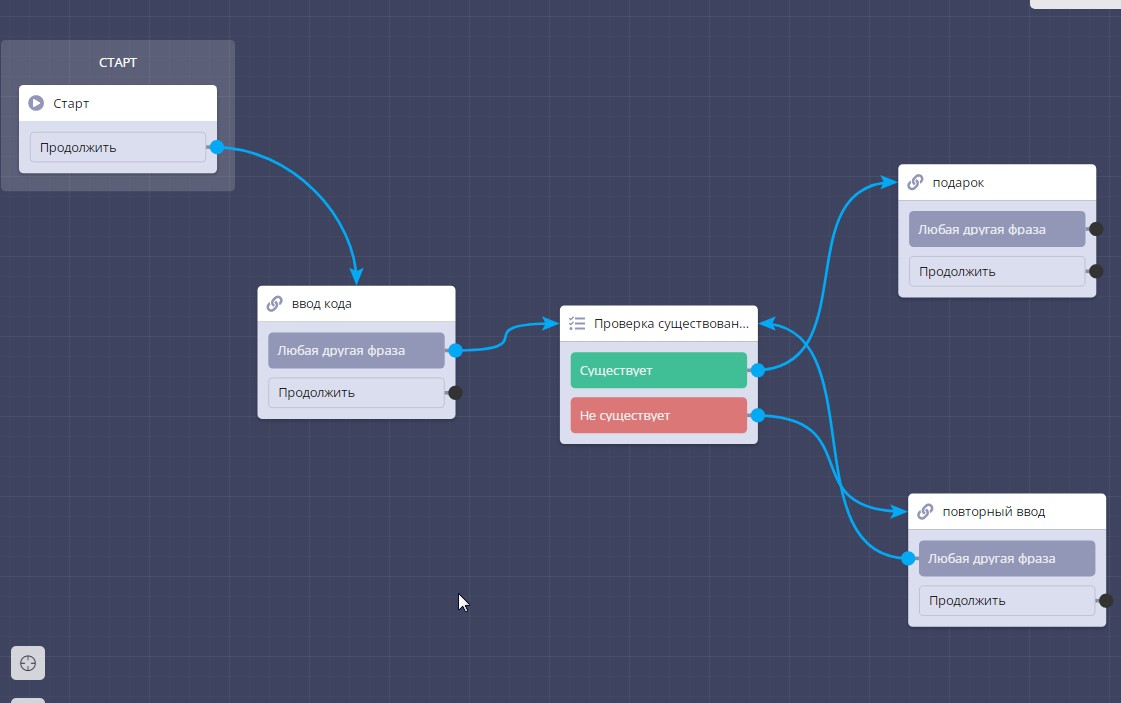
Example scenario with codes for prize distribution
9) Sending Random Prize with Ability to Configure Drop Probability Percentage
Message Chain + A/B Testing + Message Chain.
In the "message chain" block, make a button, for example, "want prize" and lead from it to the "A/B Testing" block. There you configure how many prize options there will be and from them lead connections to the "message chain" block with the corresponding gift.
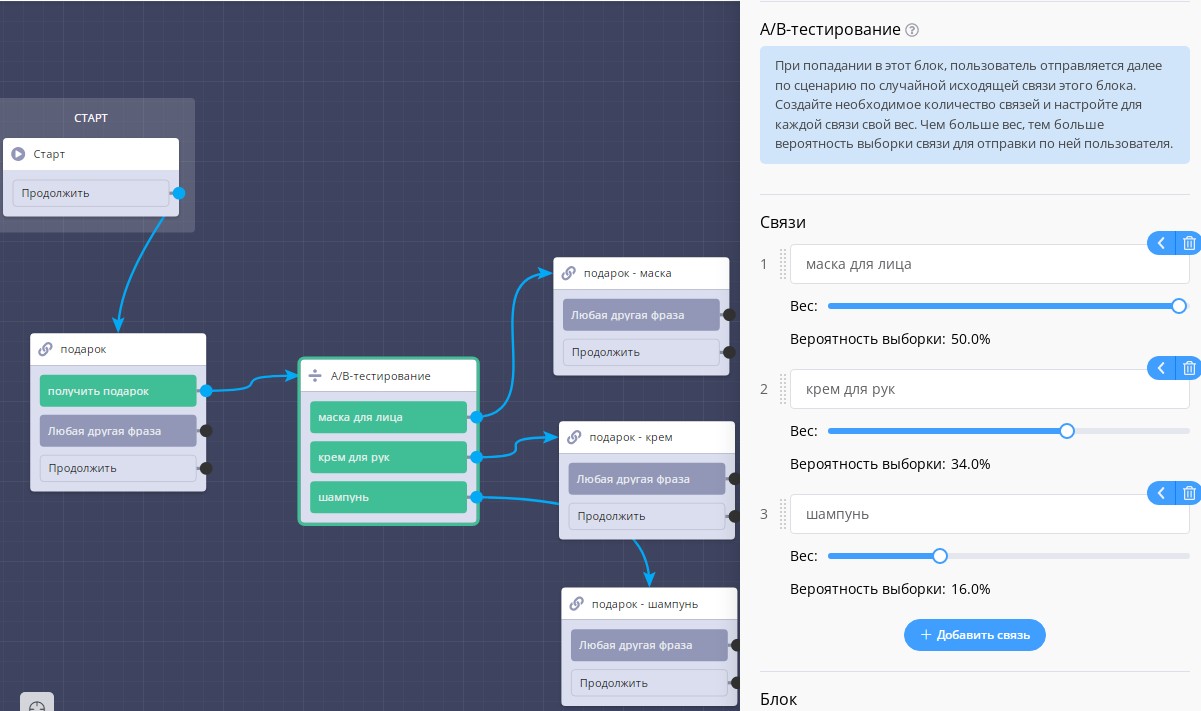
Example scenario for distributing random gifts in bot
10) Point Accrual for Answers
Message Chain + Variable Operation.
If you want to make a test where you will award points for correct answers, add a "message chain" block with several answer options. From the correct answer, lead a connection to the "variable operation" block, where you specify how many points should be awarded. And from it to the next "message chain" block.
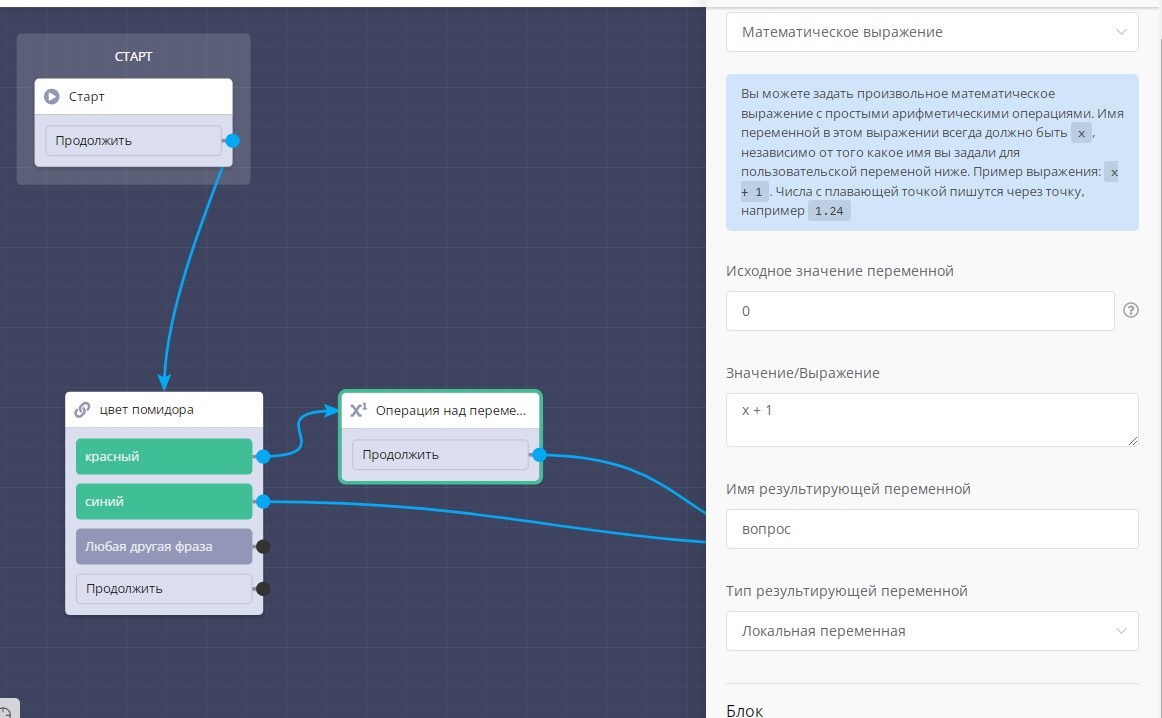
Example scenario for conducting testing with point accrual
Condition Block Can Be Placed After Condition Block and Switch
.png)
"Condition" block in scenario
To avoid accidentally looping the scenario and spending all computational resources of our servers, our platform processes no more than 20 blocks in a row standing one after another in a chain. This limit may change in the future.
Timer Block + Condition Block
Timer block can be used with other blocks, especially useful is combination with condition block. When the timer expires, the client will go to the next block through the condition block.
.png)
"Timer" block in scenario
Timer Block + Timer Block
To create an autoresponder chain, use the combination timer block + timer block.
.png)
Combining "Timer" blocks in scenario
🎁 Free course on developing chat bots and MiniApps for all users with an active PRO subscription is already on LEADTEX.
10 detailed lessons with immersion from A to Z.
Start learning right now - Start learning.