Voice Messages, Images and Documents in the AI Agent
The AI Agent understands more than text. A client can record a voice message, send a photo or a document, and the agent replies based on its content: summarizes a price list, finds a price in it, describes what is in the photo, answers a question asked by voice.
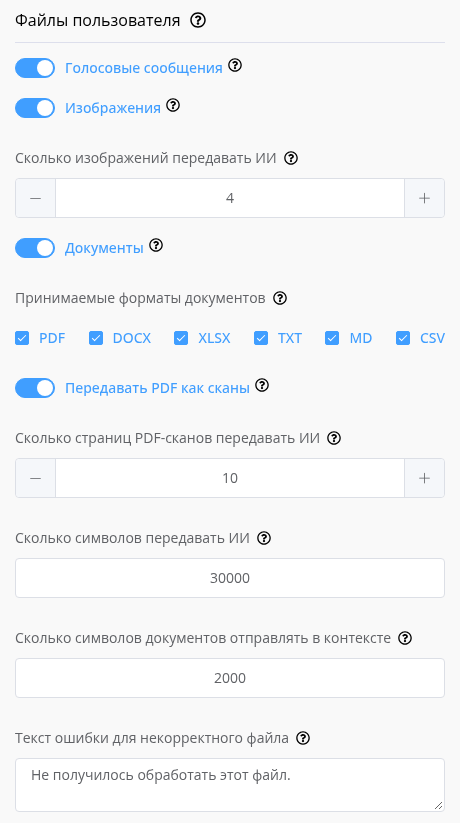
The Client files section in the block settings
How to enable
Open the AI Agent block settings, the Client files section. Each file type has its own switch:
- Voice messages;
- Images;
- Documents.
By default all three switches are off, in both existing and new blocks. While they are off, the agent works with text only, as before.
Warning
Client files are sent to the AI service. Keep this in mind if clients send documents with personal data.
When the agent reads files
The agent reads files from messages the client sends in the dialog with the agent. The message that brought the client into the block is not read: neither its text nor its files.
Tip
To let the client send a file right away, leave the First message field empty. The agent will send the Dialog start text (for example, “Send a photo or a document”) and wait for the client’s reply.
Voice messages
The agent automatically turns the voice into text and replies as if the client had typed that text. Client stop words, variables, tags and branches work on spoken text too.
The agent also recognizes audio files: MP3, M4A, WAV, OGG and others.
- Recording length: from 1 second to 5 minutes, size up to 25 MB.
- A reply to a long voice message takes longer than usual, up to a couple of minutes.
- The agent does not accept a recording shorter than 1 second, silence, or a recording longer than 5 minutes: the client gets the Error text for an invalid file.
Payment. Turning voice into text is paid with tokens separately from the agent’s reply, by recording length: the longer the voice message, the more the recognition costs.
Information
If the recording has no speech, only noise or music, the client gets the Error text for an invalid file. The recognition is still charged: the recording was processed.
Images
The agent sees the photo and replies about it: what is shown, what is written in the picture, what part or product it is. The agent treats the photo caption as the client’s question. If there is no caption, the agent replies according to the Instruction.
- Formats: JPG, PNG, WEBP, GIF, HEIC (iPhone photos).
- Size: up to 20 MB. A photo sent “as a file” without compression is accepted too.
Several photos in one message
The How many images to pass to the AI field sets how many photos from one message the agent sees: 4 by default, 10 at most. The agent knows the other photos were there but does not see them. Works only in VK and MAX. In Telegram each photo of an album arrives as a separate message: the agent replies to each one separately, and each reply is paid as a separate request.
The more images, the higher the token usage per request.
Documents
The agent reads the document text and replies based on it. For example, a client sends a price list and asks for the price of an item, or sends a contract and asks to summarize the terms.
- Formats: PDF, DOCX, XLSX, TXT, MD, CSV. In the Accepted document formats field, check which of them to accept (all by default). Files of other formats, such as DOC, XLS or archives, are not accepted.
- Size: up to 20 MB. Only the first 50 pages of a PDF are read.
How many characters to pass to the AI — how many characters of document text the agent sees in one client message. 30,000 by default. If there are several documents, the limit is shared: they are read in order. A long document is cut, and the agent knows it has not read it in full.
- Empty field — no limit.
0— the agent sees only the file name, without the text.
How many document characters to keep in context — the agent remembers the document in the following messages of the dialog too, but only its beginning. The field sets how many document characters are passed in each following request: 2,000 by default, 50,000 at most. Empty field — the maximum.
The higher these values, the higher the token usage of each request.
PDF scans
A scan is a PDF made of images, without a text layer: a photo of a contract, a scanned passport, a document with diagrams. By default the agent gets only the text from a PDF, so it cannot read a scan, and the client gets the Error text for an invalid file.
Enable Pass PDF as scans if clients send such documents: the agent will look at the PDF pages as images. In the How many PDF scan pages to pass to the AI field, set how many pages it sees (10 by default, empty field — no limit).
A scan page costs about 2.5 times more than a page of plain text.
If a file is not accepted
The agent does not accept a file if:
- this file type is off, or the format is not checked in Accepted document formats;
- the file is over the limit, empty or damaged;
- it is a video, an archive or another unsupported file.
If the client sent only such a file, they get the Error text for an invalid file (default: “Could not process this file.”). The neural network is not called, no tokens are charged, and the message does not count toward the Maximum number of requests.
If the file came with text, the agent replies to the text and tells the client itself that it could not open the file.
If a voice message could not be recognized because of a service failure or a lack of tokens, the client gets the Error message, and the block follows the Error connection.
Example
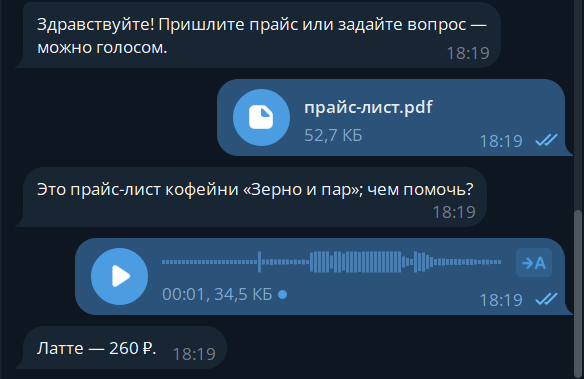
The agent answers a voice question using the price list it received
FAQ
The agent does not see the file the client sent as the first message
The agent does not read the message that brought the client into the block. Leave the First message field empty: the agent will ask for a file and read the client’s reply. See When the agent reads files.
Can I pass a file to the agent from a variable?
No. A variable holds a link to the file, and the agent does not open links. The agent reads only files the client sent in the dialog.
Does the agent watch videos?
No, in none of the messengers. For a video, the client gets the Error text for an invalid file.
How is this different from the knowledge base?
The knowledge base is your files that the agent gets in every request. Client files are what the client sends in the dialog. The knowledge base still accepts only .txt, .md and .csv.
In the LEADTEX account you already have 250+ lessons on chat bot and MiniApp development, and you can join the largest developer community with 6000+ members — Go to account.