description: "JavaScript Interpreter" block for executing JavaScript code in scenario
JavaScript Interpreter
"JavaScript Interpreter" block for executing JavaScript code in scenario
JavaScript Code Interpretation Example
Information
For setting, a special function setContactVariable is used
var name = "Leadtex";
setContactVariable("name", "name")
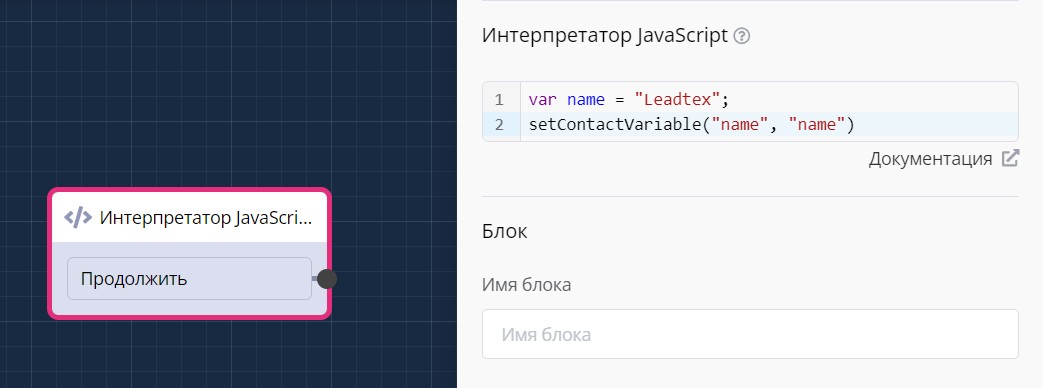
"JavaScript Interpreter" block in scenario
JavaScript Interpretation code output is done through variable {{$name}}
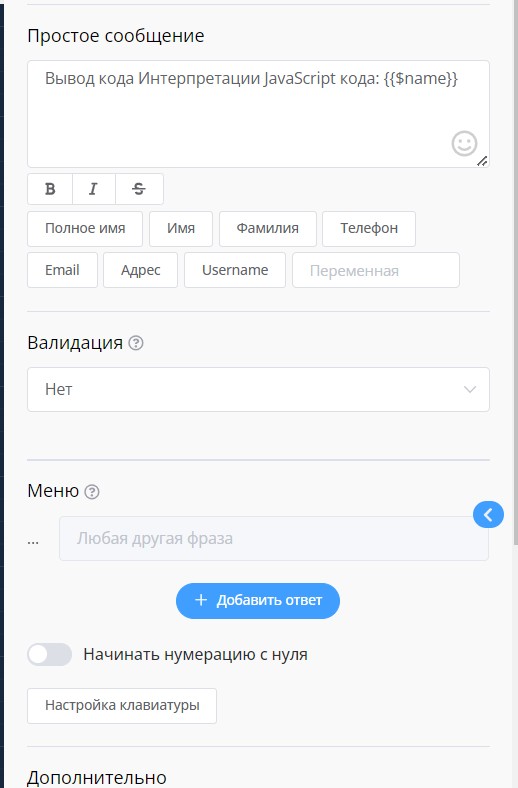
Outputting interpretation code through variable in scenario
Creating AI Assistant with GigaChat and Dialogue Memory
Detailed lesson on integrating GigaChat neural network into a chat bot using JavaScript interpreter.
Learn creating a simple AI assistant and advanced version with dialogue memory, escaping special characters, working with access tokens, and processing various GigaChat models
Ready template for implementing the project "Chat Bot with AI in 15 Minutes | Text Generation and Context Memory" in one click:
Example script from JavaScript Interpreter block for character escaping:
// Get text from variable "questionWithoutEscaping"
var question = getContactVariable("questionWithoutEscaping");
// Check if there is text in variable "question"
if (question && typeof question === "string" && question.trim() !== "") {
  // Escape all special characters
  var escapedQuestion = question
    .replace(/\\/g, '\\\\\\\\')   // Escape all backslashes
    .replace(/"/g, '\\"')     // Escape double quotes
    .replace(/'/g, "\\'")     // Escape single quotes
    .replace(/\n/g, "\\n")    // Escape line breaks
    .replace(/\t/g, "\\t")    // Escape tabs
    .replace(/\s+/g, ' ')     // Replace all spaces and line breaks with one space
    .replace(/[\u0000-\u001F\u007F-\u009F]/g, "") // Remove control characters
    .replace(/[\uD800-\uDBFF][\uDC00-\uDFFF]/g, function(match) {
      // Escape emojis and surrogate pairs
      return match.split('').map(function(char) {
        return "\\u" + char.charCodeAt(0).toString(16).padStart(4, "0");
      }).join('');
    });
  // Save escaped text to variable "question"
  setContactVariable("question", escapedQuestion);
}
Example script from JavaScript Interpreter block for recording all AI responses (creating memory)
// Check if structure for AI responses exists, if not, initialize it
var aiStructure = getContactVariable("AI Structure") || ""; // Initialize empty string if AI Structure does not exist or is null
// Get new response from AI
var aiResponse = getContactVariable("response");
// Check if there is text in variable "response"
if (aiResponse && aiResponse.toString().trim() !== "") {
  // Add new response to AI structure (accumulate text)
  aiStructure += aiResponse.toString().trim() + ","; // Separate each response with comma
  // Save updated structure for AI responses
  setContactVariable("AI Structure", aiStructure); // Save as string
} else {
  console.error("Error: variable 'response' does not contain data or is invalid.");
}
// Additionally: output current structure for verification
console.log("Current AI Structure:", aiStructure);
In the LEADTEX personal account, 250+ lessons on developing chat bots and MiniApps are already available, as well as the opportunity to join the largest no-code developer community with 6000+ participants - Go to Personal Account.